Fitting an Auto-Vox V5 rear-view mirror to our 2015 Fiat Ducato Wildax Constellation
I
know the van has got side mirrors and a reversing camera but I really miss just looking
at a rear-view mirror and seeing what's happening behind me.
After a lot of research, I bought the Auto-Vox V5 from Amazon which has both front and rear cameras and records “dashcam” footage simultaneously from both cameras. A nice feature but I bought it for the un-encumbered wide-angle view of what’s happening at the rear of our van.
Another potential benefit is that, when all the blinds are pulled at night, it is possible to switch the mirror on to give a view of what's happening outside the van - front or rear.

Challenge number one. Our van has a fitting for a rear-view mirror but no actual mirror The Auto-Vox monitor fits on using rubber straps so I needed to buy one. I sourced a genuine Fiat mirror from eBay which fitted perfectly to the existing windscreen mount.

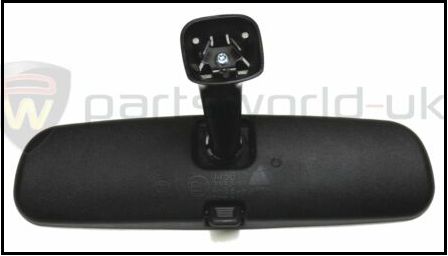
Challenge number two. Once fitted, the mirror stalk fouled the Remis blinds. It turned out that the wrong model of blind had been fitted with the cut out too low on the uprights. I was only able to solve this by purchasing a pair of blinds advertised on eBay with the correct cut outs higher up. Having to fit these helped in that, having removed the originals, I had access to run the three cables from the Auto-Vox monitor neatly in the headlining and down the side pillar for the power and GPS cables and into the rear cabin for the rear camera video cable.


Various smaller challenges emerged such as the unit only being supplied with a power supply using the cigarette lighter socket. Auto-Vox supply a hard wire solution that runs into the USB socket on the monitor, a worthwhile added cost. In my installation, it picks up the power by piggy backing onto a fuse (F51) in the dashboard fuse box that only supplies power when the ignition is switched on. If you want to take advantage of the collision detect and record function for when you are not using the van, use a constant live fuse which, on our van, includes F32, F34 and F36.

Routing the video cable through the van to the rear camera was a concern but actually turned out to be relatively straightforward job. The trickiest part was getting the cable into the side of the front overhead locker (which required removing the tambour door) and out the side of the rear locker.
The cable was run between the locker frames and their backing. This required a bit of leverage to make the gap on a few of the lockers! The lockers are backed with a fleecy-type carpet and it was possible to attach the cable out of sight behind the locker doors using Velcro.

With the locker doors open, the cable isn't visible.

I didn’t want to drill holes to fix the rear camera and, fortunately, the sticky pads supplied (3M) were strong enough to support it without screws.

The video cable was routed into the bottom of the
rear brake light cover and through into the van body following the existing
reversing camera cable. I used a nylon draw tape to fish the cable through to
the side pillar opening (see photo below) from where it could be joined to the monitor cable which I had
fed out through the side of the rear of the end locker. Easier to do than
describe!

